One Machine, 6400 PR Deployments
PR preview environments aren’t a new idea. Vercel, Netlify and plenty of tools do this for frontend apps. But when your product is a database platform with a backend, a worker, a query executor, Postgres, Redis and a frontend, those tools don’t really work.
Nobody asked me to build this. I saw a gap in how we reviewed PRs at NocoDB and decided to fix it. The result is an internal system that gives every PR its own full environment, all running on a single machine. It’s opinionated, cost-efficient and has handled over 6400 deployments since April 2025.
Why I built it
Testing a PR used to mean checking out the branch locally and running a local dev setup that hardly matched production for most. No Redis usually, no worker container, sometimes even SQLite instead of Postgres.
Our test suite covered functionality but what about UI issues, tiny nits from the design team, or corrections from product? Those were either caught on staging (extra round trip) or the non-dev people had to somehow run the local dev suite themselves (never happened).
Now someone opens a PR, CI builds the image, calls the deploy endpoint and posts a comment with an internal link. Anyone on the team clicks it and has a full working environment. Engineers, product, doesn’t matter. It changed how the team works.
The setup
One server runs shared infrastructure: Postgres, Redis and Nginx for TLS termination. Every PR gets its own set of Docker containers (the app, a background worker, a query executor) that connect to shared services but are otherwise isolated.
The key decision was mirroring what we actually run in production. Same Postgres (Neon), same Redis (Elasticache-compatible), same worker setup. Bugs that only show up with real queues or real cache behavior don’t slip through here. Stripe is also wired up out of the box, which was a mess to configure locally.
I wrote a Node.js control plane that handles the lifecycle. GitHub Actions calls it on every push:
- POST
/api/v1/devenvwith a PR number and Docker image tag - The system copies a template docker-compose, substitutes PR-specific variables (database name, Redis prefix, public URL) and runs
docker compose up - A post-deploy script waits for the health check, creates test users and configures the environment
Template environment
There’s a persistent environment called develop that tracks the head of the develop branch. It’s a real, running environment that anyone on the team can use and populate. Need a workspace with specific tables, sample data, configured integrations? Set it up in develop and every new PR environment clones from it.
New PR environments are Postgres clones of whatever develop looks like at that point:
CREATE DATABASE pr_1234_meta WITH TEMPLATE develop_meta;
CREATE DATABASE pr_1234_data WITH TEMPLATE develop_data;
Once the image is built (about 8-9 minutes), a full environment is up in under a minute.
This means engineers don’t start with an empty product. They get something that looks like a real account with real data already in place. If someone adds a feature that needs specific seed data, they add it to develop once and every future PR inherits it.
Nginx handles TLS with a wildcard certificate for the internal domain. Behind it sits a Node.js reverse proxy I wrote that extracts the subdomain from the Host header, looks up the container IP and forwards the request.
pr-1234.internal → Nginx (TLS) → Node proxy → Docker container IP:8080Container IPs are cached after the first lookup to avoid hitting the Docker API on every request. The cache clears on destroy or hibernation. WebSocket connections (used for realtime collaboration in NocoDB) go through the same proxy with a proper upgrade handler. This was one of the things that took longer than expected to get right. Long-running connections need generous timeouts and careful error handling or they silently drop.
Hibernation and wake-on-request
Most environments are idle most of the time. Someone deploys a PR, a reviewer looks at it, then it sits there for days. Hibernation is what lets me keep it all on one box.
Every request updates a timestamp per environment. A background job checks every minute: if an environment hasn’t seen traffic in 15 minutes, it gets hibernated (docker compose stop). The containers pause, state is preserved, resources are freed.
When someone visits a hibernated environment, the proxy holds the incoming request, triggers a resume (docker compose up -d) and waits for the health check to pass before forwarding it. The caller just sees a slow page load. Most of the time this takes a few seconds, the containers are still on disk and start quickly.
But Docker’s image pruning runs on a schedule too. If it already cleaned up the layers, the resume has to pull the image again before starting the containers. That turns a 3-second wake-up into 30-60 seconds depending on image size. It’s rare but noticeable when it happens. The request still holds, the caller still gets their page, it just takes longer. I considered pre-pulling images on a schedule but it wasn’t worth the complexity for how rarely it occurs.
This means 100 PR environments can live on a machine that could only run maybe 16-20 simultaneously. Most of the time only 5-6 are active. One machine, no extra cost.
Redeployment and runtime config
When you push to an existing PR, the system swaps the containers to the new image but preserves the data. The environment URL stays the same, the state carries over. This is important because engineers often build on top of what they set up in previous pushes. If someone wants a fresh start, there’s a Purge & Reset button in the dashboard that drops the databases, re-clones from templates and brings up a clean environment. It’s manual and intentional, not automatic.
Any PR can also have custom environment variables stored in a table. The deploy script fetches them and appends them to the environment config before starting the containers. The team uses this heavily for testing on-premise features. NocoDB runs in different modes (cloud, on-premise licensed, on-premise unlicensed) and each mode behaves differently. Instead of maintaining separate test setups, you set a few env vars on your PR and the environment boots in the right mode. Same for feature flags, debug settings or anything that would normally require a config change.
Stripe is another one. Every PR environment is wired to a Stripe test account with plans, subscriptions, checkout flows and webhooks working out of the box. The control plane listens for Stripe webhooks and broadcasts them to active environments, skipping hibernated ones to avoid unnecessary wake-ups. Before this existed, testing payment features required special setup that most developers didn’t bother with.
Dogfooding
The dashboard for all of this is NocoDB itself. PR number, image tag, status, URL, timestamps, all tracked in a NocoDB table. The control plane reads and writes to it through the API.
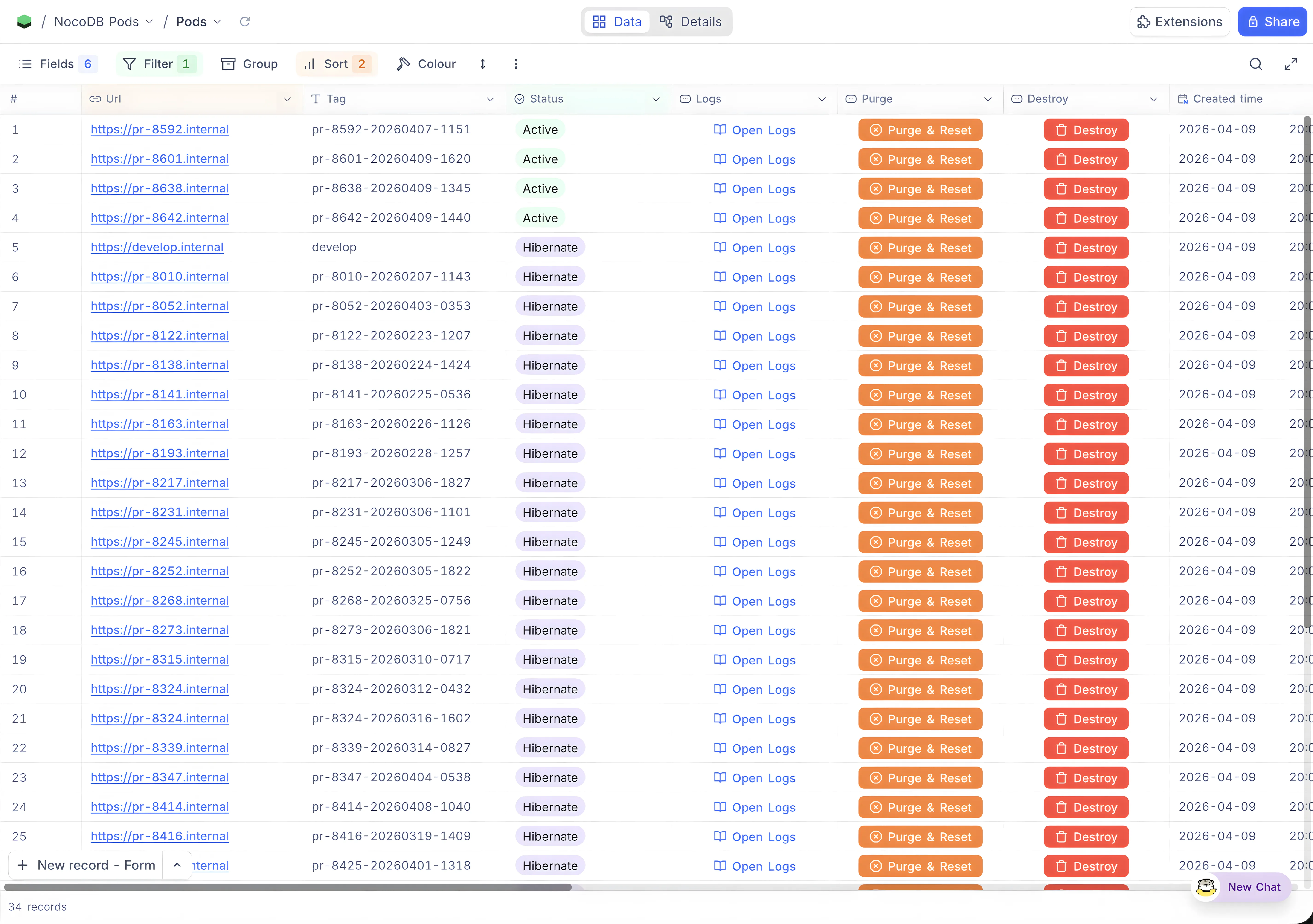
Using NocoDB to manage the deployment of NocoDB felt strange at first but it turned out to be one of the better decisions. The data is structured, everyone on the team can see what’s running without asking, and it doubles as a lightweight view into PR activity. Which ones are being actively tested, which are stale, how often someone is pushing. Not a metrics dashboard, but you’d be surprised how much it tells you.
Numbers
Since April 2025:
- 6400+ deployments across 1,071 unique PRs
- Average of 6 deployments per PR (push, review, fix, push again)
- ~20 deployments per active day, 325 active days out of ~365
- 88% weekday, 12% weekend
- 98% success rate (129 errors out of 6,387)
The thing that made this work isn’t any single technical decision. It’s that preview environments removed a bottleneck nobody was naming. PRs used to sit in review because trying them was friction. Now trying them is a click. Product people catch things before staging. Design reviews happen on real data. Engineers test against the actual infrastructure instead of a local approximation.
Whether your product is complex or simple, if you’re working with a team, PR previews are a must have, especially if you have non-developers in the loop. A single mediocre machine can be all it takes. How you build it is up to you. But when anyone on the team can try a PR without asking an engineer for help, you’ll wonder how you worked without it.